How to Optimize Mozilla Firefox Browser


  • Manual Tricks
  1. Type "about: config" into the address bar and press enter. down scroll down andlook for the following posts: network.http.pipelining
                    network.http.proxy.pipelining
                    network.http.pipelining.maxrequests
         Normally the browser will make one request to a web page at a time. when youenable pipelining it will      
         make a few pages at a time. and will speed up pageloading.
     
      2. Change the following entries to: Set "network.http.pipelining" to "true"
                                                          Set "network.http.proxy.pipelining" to "true"
                                                          Set "network.http.pipelining.maxrequests" to some number like "30".  
                                                          This means it will make 30 requests at once.

      3. Finally click on the left (where it) select New -> Integer. input "nglayout.initialpaint.delay" the prefence   
          name, then set the value to "0".


          The manual method can improve the speed of 20% -30%....


  • Use FasterFox
To increase the speed of Firefox is by using the add-on for Firefox called FasterFox. FasterFox make more effective use of bandwidth that can accelerate the performance of Firefox. You can download the FasterFox at the address: http://fasterfox.mozdev.org.


  • Use FireTune
FireTune for Mozilla Firefox v1.x / 2.x is one additional tool to be easily and quicklyoptimize your firefox browser. Firetune will optimize several internal adjustments offirefox for better, faster and stable when browsing. It is true we can possibly help tooptimize Firefox manually as previously cara2. But if there is a quick and easy way would we choose a quick and easy is not it?? Just run FireTune software and select Fast Computer / Fast conection and then click Create backup ofconfiguration, click Tune it! Lets restart firefox and see the change?


Software can be downloaded at: http://www.softpedia.com/progDownload/FireTune-Download-20945.html

  • Setting Windows
Basically the windows OS is limiting the bandwidth for Internet connections as much as 20% of the total bandwidth should be maximum.
“If you disable this setting or do not configure it, the system uses the default value of 20 percent of the connection”
If you want to increase Internet bandwidth connections so much faster then the way is to reduce or vacate the bandwidth constraints so that on Windows we can optimally use the bandwidth. The trick is as follows:

Click Start-Run Type gpedit.msc Once entered click Administrative Templates,Network, QoS Packet scheduler then click on Limit Reservable Bandwidth


And change the setting to Enable, and then change the Bandwidth limit to 0
Click Apply, ok then exit and restart the computer

How to enter blocked web

First we find out about Dns is: DNS (Domain Name System) is a system that functions in translating a host address (eg: www.friendster.com) into IP addresses (209.11.168.133). In principle, the address used to locate a destination / destination is not using his own name but using the IP address. This is described in principle based on the OSI reference model. In the event of a packet encapsulation segment there will be additions to the network layer header is the IP addressthe address you want to target and address sent itself.This IP address lookup events happening in the upper layer is the Application layer, where DNS will send a query or request to the DNS server, asking for the IP address of the host to be addressed. Once the address is obtained, then this address will be added by the network layer of all segments received from the transport layer. The use of DNS is very important because the human brain's ability to remember series of numbers is much more difficult than remembering a name. Nearly all services in the network sought to use the name, such as web, mail and other services such as telnet, ssh as a replacement for the use of IP addresses from accessing services that facilitate communication.

  • Shoot the target ip address
         Most software is blocking the website just do a DNS-Blocking on its course is its IPaddress is not in blocking. We can exploit this weakness to go to the website(note: we only bias to open a page just to get to the next root2 we have to write thelg ip address / its root) First we find the corresponding IP address to ping a web destination (use cmd), tau ping ga? Wow it's ping command to send a packet of data from one computer to another computer terhbung in a jaringan.digunakan alsoto check the computer connectivity is actually connected or not with the network.


Next after knowing his ip address is: 209.11.168.133 Go directly to the browser and enter the address


  • Use Proxy Animous
Many providers of proxy web animous like http://ninjaproxy.com


Then drag the cursor to the bottom to find ..


on the Enable HTTPS Secure Mode (harder to block), enter the dns (web address)Click next to go ... will be taken:
http://www.ninjacloak.com/index.php/1110110A/5ca836daf2a543d5117e03fa43d7017d8e

Actually there are many proxy webservice providers Animous example: http://cockyproxy.com,http://www.proxy4free.com, http://www.multiproxy.org, http://free-proxies.com, etc.


  • Use  proxy change softwares

In addition to utilizing web services (Animous Proxy) to replace the proxy we can also use software to convert / replace proxy. I will not explain how to use thesoftware instead of the proxy, because you can learn yourself. Here's the software that you can use to change the proxy:
download Multiproxy in http://www2.multiproxy.org/mproxy12.zip
download a4proxy in http://www.inetprivacy.com/ftp/a4proxy.exe
download proxy switcher in http://www.proxyswitcher.com/pub/ProxySwitcherStandard.exe

  • Browser Setting
Mozilla  to change the proxy via the Mozilla browser:tool-Options-Advanced-Network-Settings select Manual proxy configurastionchecklist use this proxy server for all protocols delete localhost, 127.0.0.1 contents of HTTP Proxy: Port xxx xxx.xx.xxx.xx click ok2x
for ie browsers (Internet Explorer) Internet Options-conecton-LAN-check thesettings in the Use a Proxy server for your LAN check the contents of the addressport bypass proxy ok-ok

Hope this article help slving your problems.

source:anharku


How to download a full Website using HTT Track

HTTrack is an easy-to-use offline browser utility. It allows you to download a World Wide website from the Internet to a local directory, building recursively all directories, getting html, images, and other files from the server to your computer. HTTrack arranges the original site's relative link-structure. Simply open a page of the "mirrored" website in your browser, and you can browse the site from link to link, as if you were viewing it online. HTTrack can also update an existing mirrored site, and resume interrupted downloads. HTTrack is fully configurable, and has an integrated help system

You can download the freeware : http://www.httrack.com/page/2/

How to use :

Step 1: Choose a project name and destination folder
Change the destination folder if necessary. It is more convenient to organize all mirrors in one directory, for example My Web Sites. If you already have made mirrors using HTTrack, be sure that you have selected the correct folder.
Select the project name:
o Select a new project name. This name is, for example, the theme of the mirrored sites, for example My Friend's Site. OR. Select an existing project for update/retry. Directly select the existing project name in the popup list.
o Click on the NEXT button.


Step 2: Fill the addresses
Select an action. The default action is Download web sites
o Download web site(s). Will transfert the desired sites with default options
o Download web site(s) + questions. Will transfert the desired sites with default options, and ask questions if any links are considered as potentially downloadable
o Get individual files. Will only get the desired files you specify (for example, ZIP files), but will not spider through HTML files
o Download all sites in pages (multiple mirror). Will download all sites that appears in the site(s) selected. If you drag&drop your boormark file, this option lets you mirror all your favorite sites
o Test links in pages (bookmark test). Will test all links indicated. Useful to check a bookmark file
o * Continue interrupted download. Use this option if a download has been interrupted (user interruption,crash..)
o * Update existing download. Use this option to update an existing project. The engine will recheck the complete structure, checking each downloaded file for any updates on the web site
Enter the site's addresses. You can click on the Add a URL button to add each address, or just type them in the box.
You may define options by clicking on the Set options button. You can define filters or download parameters in the option panel.
You may also add a URL by clicking on the Add a URL button. This option lets you define additional parameters (login/password) for the URL, or capture a complex URL from your browser.
Click on the NEXT button Komunitas eLearning


Step 3: Ready to start
If you want, you may connect immediately or delay the mirror. If you don't select anything, HTTrack will assume that you are already connected to the Internet and that you want to start the mirror action now
o Connect to this provider. You can select here a specific provider to connect to when begining the mirror if you are not already connected to the Internet.
o Disconnect when finished. Click on this checkbox to ask httrack to disconnect the network when mirror is finished.
o Shutdown PC when finished. Click on this checkbox to ask httrack to shutdown your computer when mirror is finished.
o On Hold. You can enter here the time of the mirror start. You can delay up to 24 hours a mirror using this feature.
Click on the FINISH button


Step 4: Wait!
Wait until the mirror is finishing. You can cancel at any time the mirror, or cancel files currently downloaded for any reasons (file too big, for example) Options can be changed during the mirror: maximum number of connections, limits...


Step 5: Check the result
Check log files. You may check the error log file, which could contain useful information if errors have occurred


Option panel
Click on one of the option tab below to have more informations Each option tab is described, including remarks and examples


How to use Using Gmail as a Drive storage


Gmail or Google Mail service is a provider of free webmail and POP3 owned by Google.  To have a Gmail account ,  we can Sign Up in the Gmail.com site. Gmail provides 2 Giga bytes of space to accommodate e-mail. Currently there are software add-on for Microsoft Windows called GMail Drive.software. This software serves to utilize space in Gmail account as a drive which can store virtual data. How to use it very simple, but first we must have a first software GMail drive. This software can be downloaded at the site softpedia.com or Gmail Storage Drive – Download 
After the software is downloaded we need to install it by 2 times by clicking the setup file.
Just a minute after the installation window will appear like this:


we just close it and GMail Drive is installed on our computers. to see it
go into My Computer. Then we will find the new drive is labeled GMail Drive.

To use Gmail Drive just double clicks it. Once clicked it will display the window
as follows:


We just enter the username and password you Gmail account and then click ok
Once we click ok then the window will pop up logging on to Gmail as below:


after logging will display a window like this::


We can use it like a regular storage drive. We can copy and paste a file,
create a folder, delete the folder and check the space that we already use.
To exit from the GMail drive we can by right-clicking the icon on my GMail Drive
computer and then choose Log Out​​.


How to watch free Korean tv from internet live


You can watch Korean tv show free from internet, Your internet connection should be minimun 768 KBPS
You can download a software of just watch from your browser directly
To download a software u can open this link : http://tvants.en.softonic.com/download
After that,you should download and install the software to your PC, then you can turn on by clicking
start -> all program -> TVAnts -> TVAnt .You can instantly enjoy the show Korean television shows
or you can open these links from your browser

http://beelinetv.com/

Andong MBC
Daegu MBC
KCTV
MBN Live


source : carapedia

How to create a blog at blogger.com

Step 1: Sign Up to Create a Blog at Blogger.com


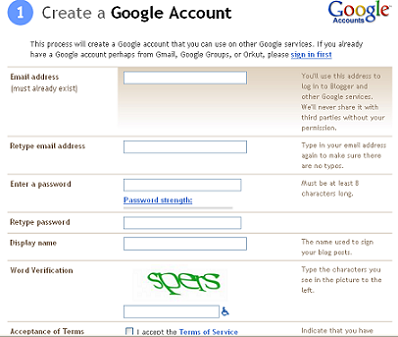
Step 2: Create a Google Account


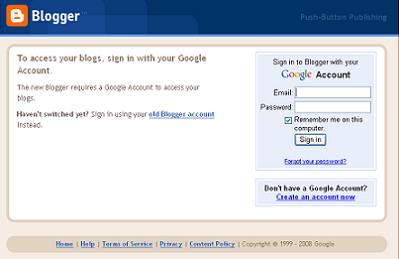
Step 3: Sign In with Your Google Account


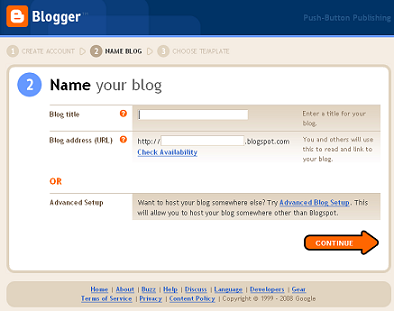
Step 4: Name Your New Blog


Step 5: Choose a Template


Step 6: Congratulations - Your New Blog is Active!


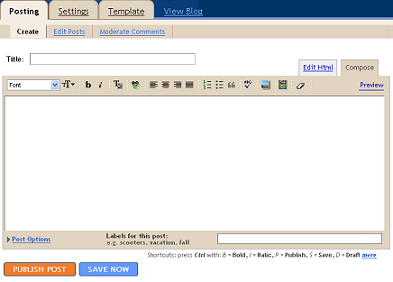
Step 7: Write Your First Post